⌘ K
  • Design Principles
  • Design Framework
  • UX Laws
  • Colours
  • Typography
  • Layout Grids
  • Spacing & Radius
  • Shadow & Blur
Product Design Process
Accessibility Guideline
Content Voice
Marketing & Collaterals
  • Accordion
  • App Bar
  • Avatar
  • Badge
  • Button
  • Breadcrumb
  • Bottom Navigation
  • Carousel
  • Cards
  • Checkbox
  • Chip
  • Date Picker
  • Dropdown
  • Dialog
  • Divider
  • Floating Action Button
  • Footer
  • Header
  • Link
  • Loader
  • Menu
  • Pagination
  • Popover
  • Progress Bar
  • Radio Button
  • Search
  • Sidebar
  • Slider
  • Skeleton
  • Statistic
  • Stepper
  • Switch
  • Table
  • Tabs
  • Tag
  • Text Field
  • Timeline
  • Toast Message
  • Tooltip
  • Upload
  • Logos
  • System Icons
  • Visual Icons
  • Illustrations
  • Images
  • Tones
Templates
v 1.0
  • About Helix
  • For Designers
  • For Developers
  • Components

Colours

Colours are significant for brand identity, emotional impact, accessibility, visual hierarchy, and design consistency.

Colours

We carefully selected primary and secondary colours that embody our brand identity. These variations maintain uniformity, establish a clear hierarchy, and enhance readability and usability.

Below, we've outlined the different colour schemes utilised within our system.

Primary colours

The primary brand colours for Helix are red and blue, representing energy, vitality, and stability.

Red is used to highlight action buttons, important text, links, active states, brand illustrations, and graphics, ensuring a vibrant and dynamic user interface.

Blue is equally important, serving as the background, text highlighter, and for icons, menus, buttons, and headlines on all platforms.

Brand Red

#ED1C24

Color/Primary/Brand Red

Brand Red 2

#B11116

Color/Primary/Brand Red 2

Brand Blue

#005E9E

Color/Primary/Brand Blue

Red 25

#FFFBFB

Color/Primary/Red 25

Red 50

#FEF6F6

Color/Primary/Red 50

Red 100

#FDE7E8

Color/Primary/Red 100

Red 200

#FBCBCD

Color/Primary/Red 200

Red 300

#F8AAAD

Color/Primary/Red 300

Red 400

#F57B7F

Color/Primary/Red 400

Red 500

#ED1C24

Color/Primary/Red 500

Red 600

#D91118

Color/Primary/Red 600

Red 700

#BD0F15

Color/Primary/Red 700

Red 800

#A10D12

Color/Primary/Red 800

Red 900

#76090D

Color/Primary/Red 900

Red 950

#550709

Color/Primary/Red 950

Blue 25

#F5FBFF

Color/Primary/Blue 25

Blue 50

#EBF7FF

Color/Primary/Blue 50

Blue 100

#D1EDFF

Color/Primary/Blue 100

Blue 200

#9ED8FF

Color/Primary/Blue 200

Blue 300

#5CBEFF

Color/Primary/Blue 300

Blue 400

#0093F5

Color/Primary/Blue 400

Blue 500

#005E9E

Color/Primary/Blue 500

Blue 600

#00538A

Color/Primary/Blue 600

Blue 700

#00497A

Color/Primary/Blue 700

Blue 800

#003A61

Color/Primary/Blue 800

Blue 900

#002842

Color/Primary/Blue 900

Blue 950

#001C2E

Color/Primary/Blue 950

Neutral colours

Neutral colours, mainly grey and black, form the foundation of the colour system. They complement brand colours in UI design, often used for text, form fields, backgrounds, and dividers.

White

#FFFFFF

Color/Neutral/White 800

Gray 25

#FCFCFD

Color/Neutral/Grey 25

Gray 50

#F9FAFB

Color/Neutral/Grey 50

Gray 100

#F3F4F6

Color/Neutral/Grey 100

Gray 200

#E5E7EB

Color/Neutral/Grey 200

Gray 300

#D2D5DA

Color/Neutral/Grey 300

Gray 400

#BEC3CC

Color/Neutral/Grey 400

Gray 500

#9CA3AF

Color/Neutral/Grey 500

Gray 600

#717684

Color/Neutral/Grey 600

Gray 700

#4B5563

Color/Neutral/Grey 700

Gray 800

#374254

Color/Neutral/Grey 800

Gray 900

#1C2633

Color/Neutral/Grey 900

Gray 950

#0C111D

Color/Neutral/Grey 950

Secondary colours

Secondary colors complement primary colors, adding visual interest and creating a more versatile, dynamic color palette.

Red

Red attracts the most attention. This color is associated with excitement, energy, and action.

Red 25

#fef8f8

Color/Status/Red 25

Red 50

#fef1f1

Color/Status/Red 50

Red 100

#fde8e7

Color/Status/Red 100

Red 200

#fbcdcb

Color/Status/Red 200

Red 300

#f9adaa

Color/Status/Red 300

Red 400

#f5837f

Color/Status/Red 400

Red 500

#f03e38

Color/Status/Red 500

Red 600

#e81811

Color/Status/Red 600

Red 700

#cc150f

Color/Status/Red 700

Red 800

#a6110c

Color/Status/Red 800

Red 900

#800e0a

Color/Status/Red 900

Red 950

#510906

Color/Status/Red 950

Blue

Blue colour is associated with trust, reliability, calmness and stability.

Blue 25

#F4F8FE

Color/blue/Blue 25

Blue 50

#E5EFFF

Color/blue/Blue 50

Blue 100

#D9E7FF

Color/blue/Blue 100

Blue 200

#C2D9FF

Color/blue/Blue 200

Blue 300

#99C0FF

Color/blue/Blue 300

Blue 400

#6BA4FF

Color/blue/Blue 400

Blue 500

#3884FF

Color/blue/Blue 500

Blue 600

#186CF2

Color/blue/Blue 600

Blue 700

#0057E5

Color/blue/Blue 700

Blue 800

#0048BE

Color/blue/Blue 800

Blue 900

#00358C

Color/blue/Blue 900

Blue 950

#002258

Color/blue/Blue 950

Light Blue

Light blue shades are used in various design elements like icons and illustrations to convey a sense of calmness.

Light Blue 25

#f8fdff

Color/Status/Light Blue 25

Light Blue 50

#f1fbfe

Color/Status/Light Blue 50

Light Blue 100

#def5fc

Color/Status/Light Blue 100

Light Blue 200

#bdeaf9

Color/Status/Light Blue 200

Light Blue 300

#93ddf6

Color/Status/Light Blue 300

Light Blue 400

#69d0f2

Color/Status/Light Blue 400

Light Blue 500

#2bbbed

Color/Status/Light Blue 500

Light Blue 600

#13aadd

Color/Status/Light Blue 600

Light Blue 700

#1095c1

Color/Status/Light Blue 700

Light Blue 800

#0e7ba0

Color/Status/Light Blue 800

Light Blue 900

#0a5771

Color/Status/Light Blue 900

Light Blue 950

#073e50

Color/Status/Light Blue 950

Indigo

Indigo colour is associated with wisdom, dignity, and spirituality.

Indigo 25

#f9fbfd

Color/Status/Indigo 25

Indigo 50

#f4f6fb

Color/Status/Indigo 50

Indigo 100

#e6ebf5

Color/Status/Indigo 100

Indigo 200

#c9d3e9

Color/Status/Indigo 200

Indigo 300

#a4b6da

Color/Status/Indigo 300

Indigo 400

#7590c7

Color/Status/Indigo 400

Indigo 500

#3a568f

Color/Status/Indigo 500

Indigo 600

#354f83

Color/Status/Indigo 600

Indigo 700

#2e4470

Color/Status/Indigo 700

Indigo 800

#25375b

Color/Status/Indigo 800

Indigo 900

#1a2741

Color/Status/Indigo 900

Indigo 950

#121a2c

Color/Status/Indigo 950

Brown

Brown is frequently used in illustrations to depict natural skin tones, enhancing realism and inclusivity.

Brown 25

#fef6f5

Color/Brown/25

Brown 50

#fcecea

Color/Brown/50

Brown 100

#fad9d5

Color/Brown/100

Brown 200

#f7c7c0

Color/Brown/200

Brown 300

#f5b4ab

Color/Brown/300

Brown 400

#f2a196

Color/Brown/400

Brown 500

#d3857a

Color/Brown/500

Brown 600

#b4695e

Color/Brown/600

Brown 700

#944c43

Color/Brown/700

Brown 800

#763d36

Color/Brown/800

Brown 900

#592e28

Color/Brown/900

Brown 950

#3b1e1b

Color/Brown/950

Purple

Purple colour is associated with creativity and the realm of fantasy.

Purple 25

#fbf8ff

Color/Purple/25

Purple 50

#f6f1fe

Color/Purple/50

Purple 100

#f0e8fd

Color/Purple/100

Purple 200

#deccfa

Color/Purple/200

Purple 300

#c8acf6

Color/Purple/300

Purple 400

#ad82f2

Color/Purple/400

Purple 500

#8242eb

Color/Purple/500

Purple 600

#772fe9

Color/Purple/600

Purple 700

#6518e2

Color/Purple/700

Purple 800

#5514bd

Color/Purple/800

Purple 900

#3c0e86

Color/Purple/900

Purple 950

#21084a

Color/Purple/950

Yellow

Yellow is a bright, cheerful colour that elicits feelings of happiness and positivity.

Yellow 25

#fffdf7

Color/Yellow/25

Yellow 50

#fffbf0

Color/Yellow/50

Yellow 100

#fef4d7

Color/Yellow/100

Yellow 200

#fce9b0

Color/Yellow/200

Yellow 300

#fbdc7f

Color/Yellow/300

Yellow 400

#f9ce4d

Color/Yellow/400

Yellow 500

#f7bc0a

Color/Yellow/500

Yellow 600

#e3ac07

Color/Yellow/600

Yellow 700

#c69606

Color/Yellow/700

Yellow 800

#a37c05

Color/Yellow/800

Yellow 900

#775a04

Color/Yellow/900

Yellow 950

#594303

Color/Yellow/950

Green

Green is a colour that is often associated with nature, growth, freshness, and harmony. It is used to display success during any part of the process.

Green 25

#f6fef9

Color/Green/25

Green 50

#eafaf0

Color/Green/50

Green 100

#d9f7e6

Color/Green/100

Green 200

#abf2cf

Color/Green/200

Green 300

#70e0a8

Color/Green/300

Green 400

#3ecd91

Color/Green/400

Green 500

#27b077

Color/Green/500

Green 600

#0e8c58

Color/Green/600

Green 700

#067848

Color/Green/700

Green 800

#08613c

Color/Green/800

Green 900

#084d30

Color/Green/900

Green 950

#03331f

Color/Green/950

Orange

Orange creates feelings of freshness, excitement and warmth.

Orange 25

#fffcf5

Color/Orange/25

Orange 50

#fff6e0

Color/Orange/50

Orange 100

#feeec7

Color/Orange/100

Orange 200

#fddb89

Color/Orange/200

Orange 300

#fec24b

Color/Orange/300

Orange 400

#fda922

Color/Orange/400

Orange 500

#f78409

Color/Orange/500

Orange 600

#dc5d03

Color/Orange/600

Orange 700

#b53f08

Color/Orange/700

Orange 800

#93310d

Color/Orange/800

Orange 900

#7a290e

Color/Orange/900

Orange 950

#4e1a09

Color/Orange/950

Special Gradients

Use secondary colours selectively in elements like banners and labels, alongside primary colours that should take precedence

Red & Blue

Color/Gradients/red & blue

Purple

Color/Gradients/purple

Indigo

Color/Gradients/indigo

Blue & Pink

Color/Gradients/blue & pink

Silver

Color/Gradients/sliver

Primary Colours

Brand Red

Color/Primary/Brand Red

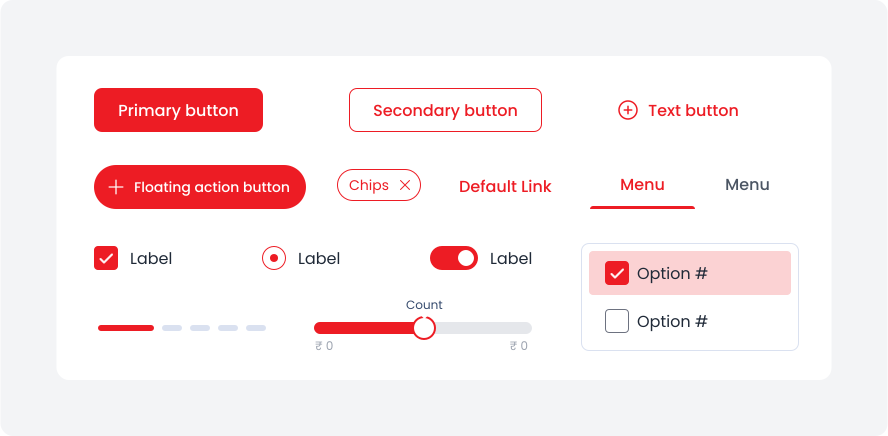
The most prominent components across the UI, such as primary and secondary actions, should utilise the Brand Red colour.

Brand Red - Utilise for action buttons, text, links, selected items, active states, floating actions, and icons.

Neutral Colours

Surface

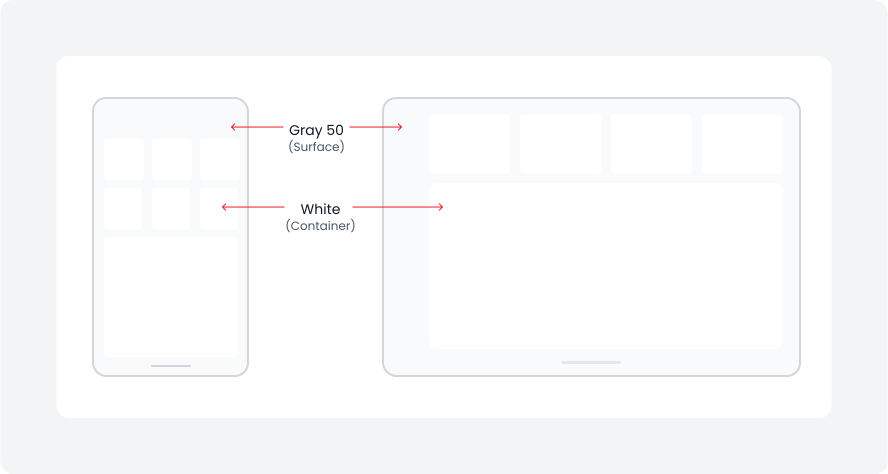
Use surface colours for neutral backgrounds and container colours for components such as cards, sheets, and dialogs.

Name

Token

Usage

Gray 50

Color/Neutral/Gray50

Use Gray 50 for surface background to create a clean and minimalist UI

White

Color/Neutral/White

Use White as a container colour on surface.

Gray tone

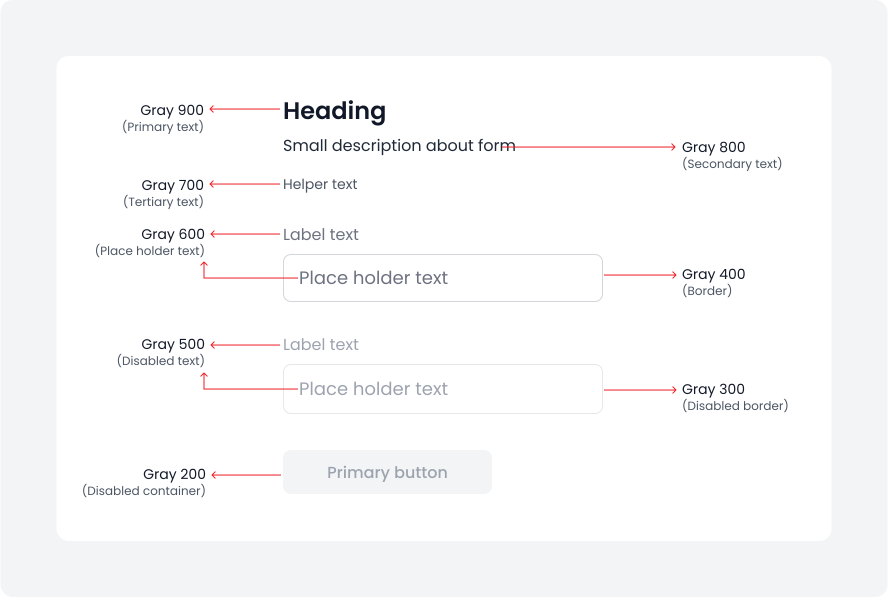
Gray tones are essential for establishing text hierarchy and defining UI elements like borders and disabled states. They also ensure accessibility by providing proper contrast.

Name

Token

Usage

Gray 900

Color/Neutral/Gray900

Gray 900 for primary text, such as display and heading text.

Gray 800

Color/Neutral/Gray800

Gray 800 for secondary text, such as paragraphs, descriptions, or informational content.

Gray 700

Color/Neutral/Gray700

Gray 700 for tertiary text, which is the least prominent and often includes supplementary information like captions, labels, helper text, and disclaimers.

Gray 600

Color/Neutral/Gray600

Gray 600 as the colour for placeholder text in forms and input fields.

Gray 500

Color/Neutral/Gray500

Gray 500 for disabled text to visually show that it's not interactive or editable.

Gray 400

Color/Neutral/Gray400

Gray 400 specifically for defining container borders and divider lines.

Gray 300

Color/Neutral/Gray300

Gray 300 to indicate disabled container borders.

Gray 200

Color/Neutral/Gray200

Gray 200 to indicate disabled container surfaces.

State Colours

Success

Color/Secondary/Green/green 600

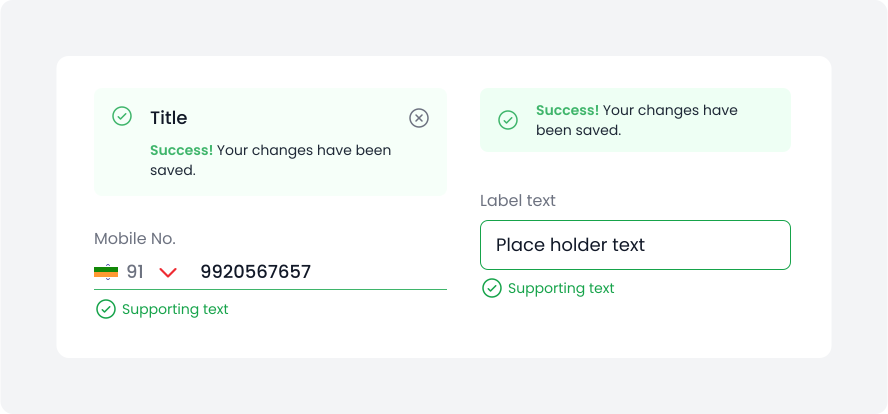
The Green 600 colour to indicate success states, such as a verified text field, providing immediate feedback to users about the successful action.

Green 600 - Use green 600 for fills, icons, and text to emphasise positive state.

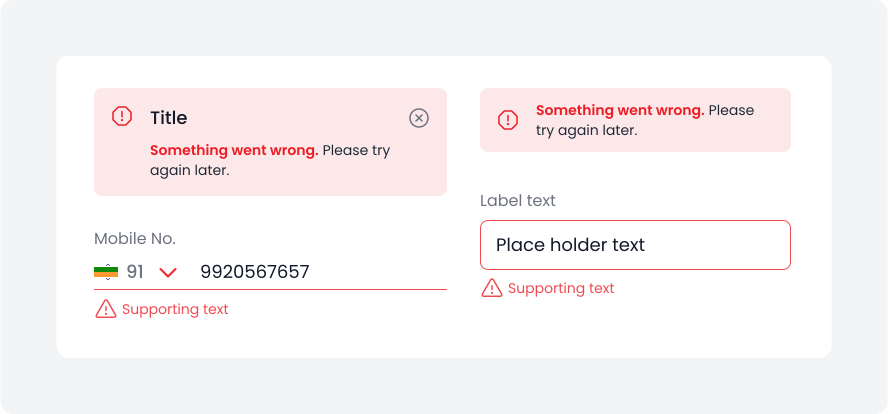
Error

Color/Secondary/Red/red 600

The error colour to indicate error states, such as an invalid text field, providing immediate and concise feedback to users about the issue.

Red 600 - Use fills, icons, and text on surfaces to highlight urgency.

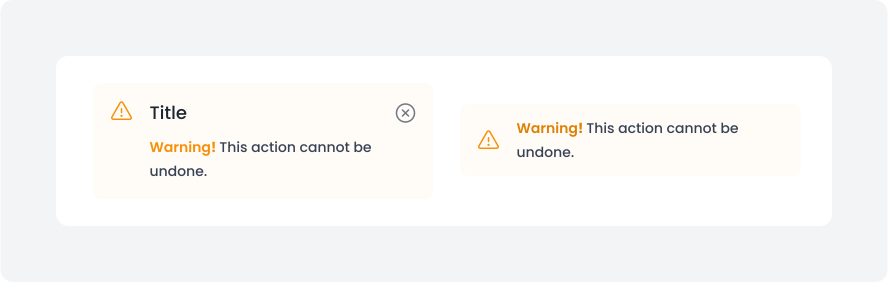
Warning

Color/Secondary/Orange/orange 600

Utilise warning colours to highlight warning states, offering immediate feedback to users.

Orange 600 - Use warning colours for fills, icons, and text to emphasise warnings.

Secondary colours

In illustrations, banners, and visuals, incorporating brand colour (brand red) is essential to ensure customer connection with the brand. Additionally, we can use shades of blue, light blue, purple, orange, indigo, brown, and green to enhance illustrations and banners.

Please refer to the examples below.

Data visualisation transforms information into engaging visuals like charts, graphs, and diagrams, simplifying complex data and revealing valuable insights.

Colours are vital in this process, shaping our perception of information. Mastering the use of colour is key to crafting impactful data visualisations.

Graphs

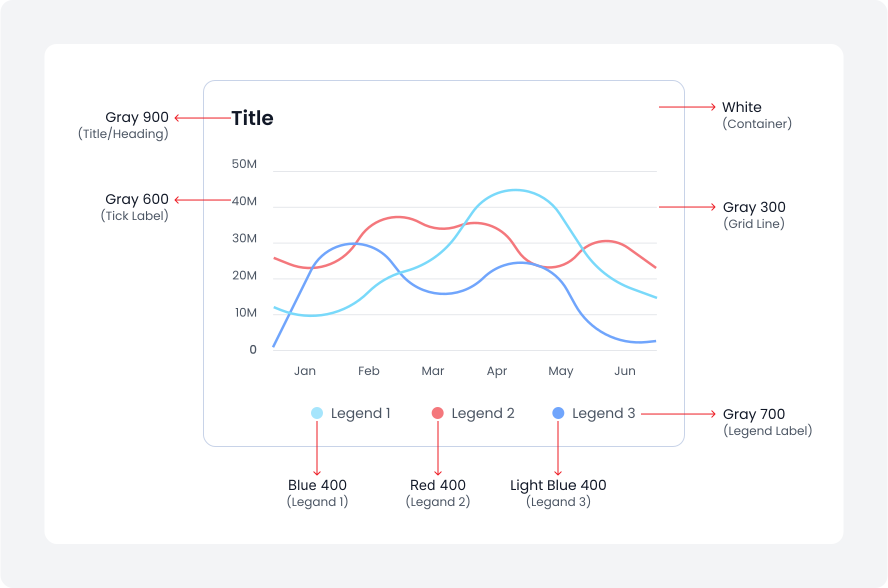
Line graph

Line charts display data points at regular intervals connected by lines. They are ideal for showing trends over time and comparing multiple data sets.

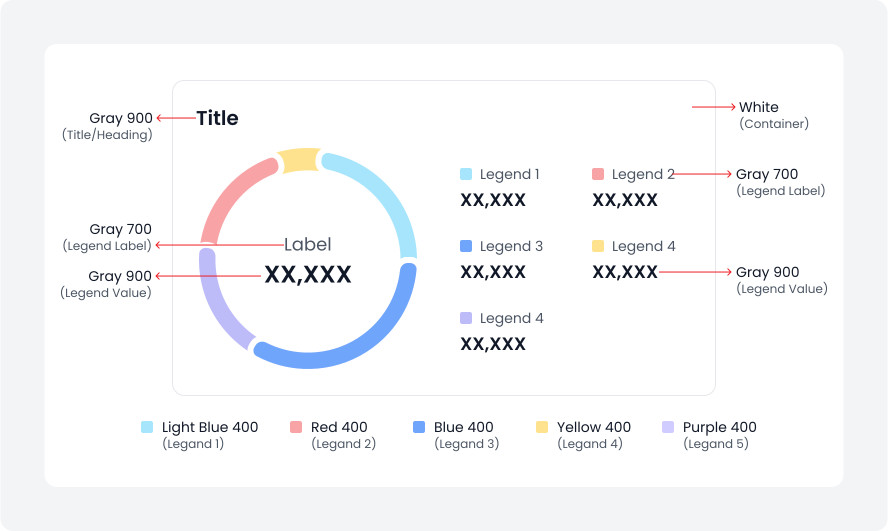
Donut graph

A donut graph is a variation of a pie chart with a blank centre, which provides space for additional information or labels. It represents data as segments of a circle, making it simple to compare parts of a whole.

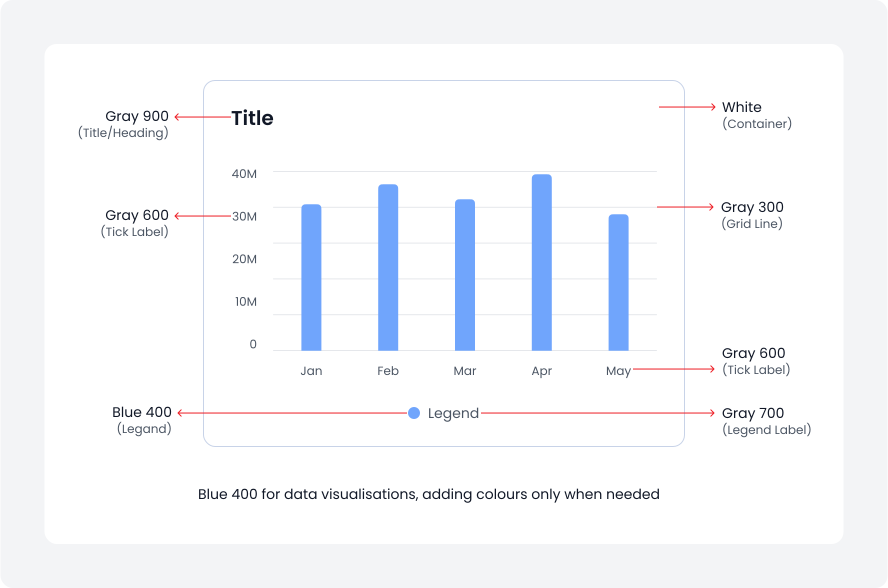
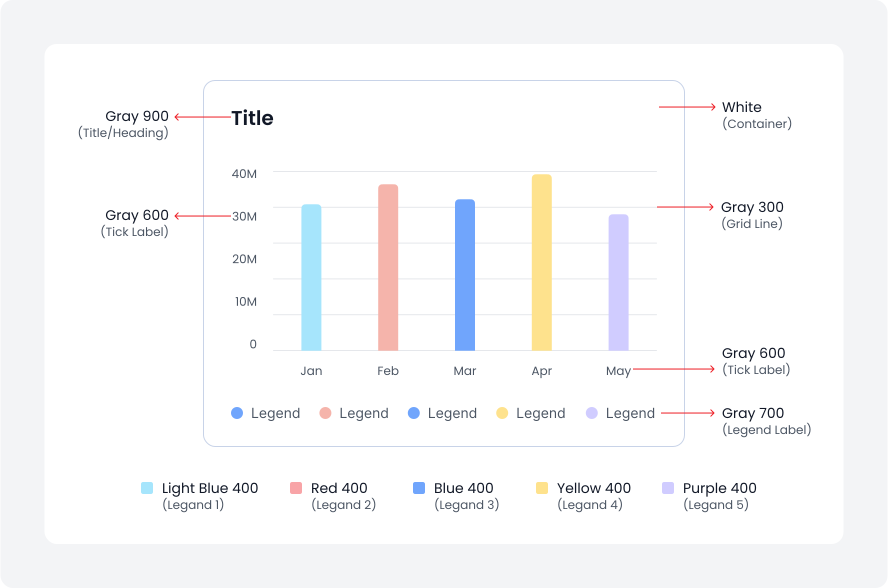
Bar graph

Bar graph use vertical or horizontal data markers to compare individual values. You can use them to compare discrete data or show trends over time.

Single colour

Single colour graph maintains a clean and cohesive look while effectively presenting data.

Multi colour

A multi-colour graph uses different colours to distinguish and compare data segments, enhancing clarity and impact.

UX Laws
Typography

Helix - HDFC Life 2025