Accordion
Accordion components show lots of information in a small space, revealing content bit by bit. Users can grasp the content by checking header titles and choose sections for more details.
Usage
- In order to organise related information.
- Use accordions to break long content into sections that users can expand or collapse as needed.
- Group similar form fields or steps together to make complex forms easier to understand and complete.
Anatomy
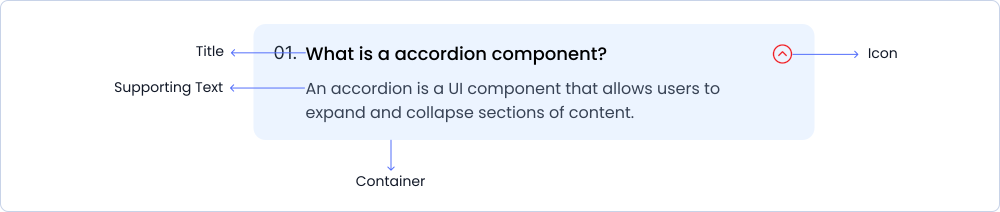
The accordion is comprised of a container housing accordion title, icon and a supporting text.
Variant
Accordion has 3 different style variants.
Primary
An accordion is a UI component that allows users to expand and collapse sections of content.
Secondary
Click on a section header to expand or collapse the content. Only one section can be expanded at a time unless multiple sections are configured to be expandable simultaneously.
Help
Use clear and concise headers, ensure logical order and grouping of content, and maintain consistency in styling and behavior.
Sizes
The accordion are available in small, medium and large sizes.
Small
An accordion is a UI component that allows users to expand and collapse sections of content.
Medium
Click on a section header to expand or collapse the content. Only one section can be expanded at a time unless multiple sections are configured to be expandable simultaneously.
Large
Use clear and concise headers, ensure logical order and grouping of content, and maintain consistency in styling and behavior.
Specifications
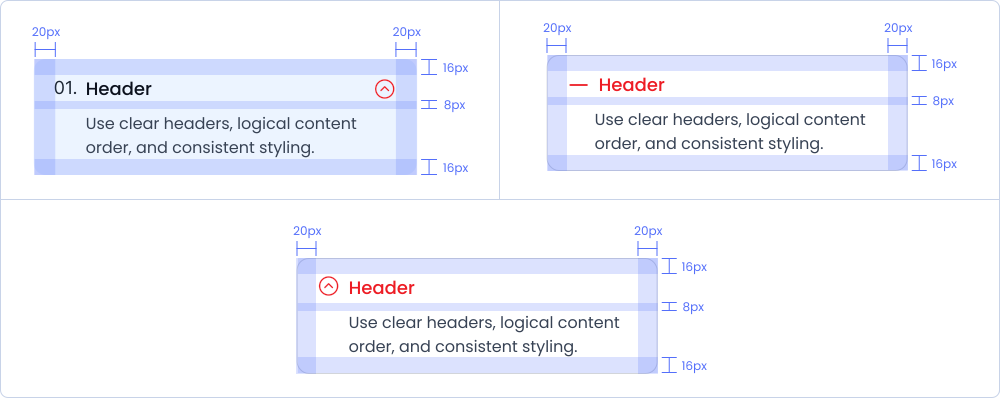
Structure and spacing measurements for accordion.
Live Demo
The Accordion is demonstrated in a live environment in this demo.