Button
A button is a clickable thing that does something when you click on it. It makes it easy for users to do things on the pages, like clicking to interact in different ways. Each button shows clearly what it does when you click on it.
Usage
- Begin a new task
- Whenever a new step is taken
- Trigger a new UI element to appear on the page
- Skip a task
Anatomy
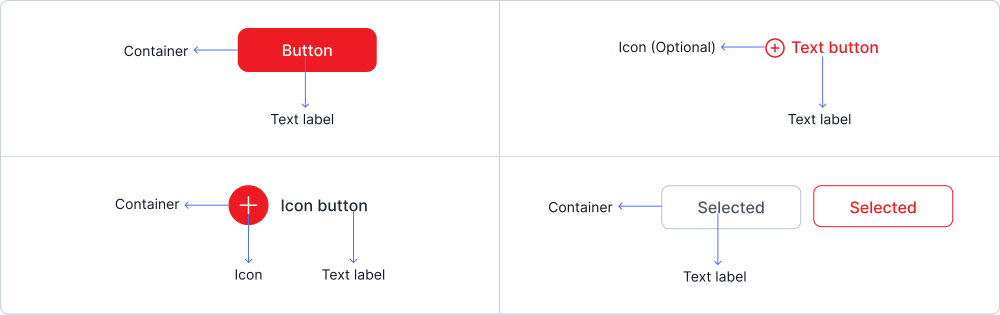
The primary element of a button is its text label, which clearly describes the action that will be triggered when clicked. Buttons consist of a container that includes a text label and, optionally, an icon, all of which together form the button component.
Variant
Button come in various variants such as common button, text button, icon button & group button.
Primary button
Tertiary button
Link button
secondary button
Sizes
Buttons are available in small, medium, and large sizes.
Large
Medium
Small
States
Buttons can be in default, hovered, pressed and disabled states.
Button
Primary / Default
Primary / Disabled
Secondary / Default
Secondary / Disabled
Link Button
Link / Default
Link / Disabled
Tertiary Button
Tertiary / Default
Tertiary / Disabled
Icon Button
Primary
Tertiary
Secondary
Link
Specifications
Structure and spacing measurements for buttons.
Button

Live Demo
The button is demonstrated in a live environment in this demo.