⌘ K
  • Design Principles
  • Design Framework
  • UX Laws
  • Colours
  • Typography
  • Layout Grids
  • Spacing & Radius
  • Shadow & Blur
Product Design Process
Accessibility Guideline
Content Voice
Marketing & Collaterals
  • Accordion
  • App Bar
  • Avatar
  • Badge
  • Button
  • Breadcrumb
  • Bottom Navigation
  • Carousel
  • Cards
  • Checkbox
  • Chip
  • Date Picker
  • Dropdown
  • Dialog
  • Divider
  • Floating Action Button
  • Footer
  • Header
  • Link
  • Loader
  • Menu
  • Pagination
  • Popover
  • Progress Bar
  • Radio Button
  • Search
  • Sidebar
  • Slider
  • Skeleton
  • Statistic
  • Stepper
  • Switch
  • Table
  • Tabs
  • Tag
  • Text Field
  • Timeline
  • Toast Message
  • Tooltip
  • Upload
  • Logos
  • System Icons
  • Visual Icons
  • Illustrations
  • Images
  • Tones
Templates
v 1.0
  • About Helix
  • For Designers
  • For Developers
  • Components
Sidebar

Sidebar

The Sidebar component is a versatile navigation element that provides a consistent and accessible way to display a menu of options or links on the side of a page. It is highly customizable and can be used to enhance user navigation by providing quick access to different sections or features of an application.

Usage

  • Use this component to provide a persistent navigation menu, allowing users to easily access various sections or functionalities within the application.
  • Perfect for dashboards where users need quick access to tools, reports, or settings.
  • Suitable for content-heavy applications, enabling users to switch seamlessly between different content categories or pages.

Anatomy

The sidebar includes a menu icon, a menu label with an active state, a badge, and a collapse/expand icon.
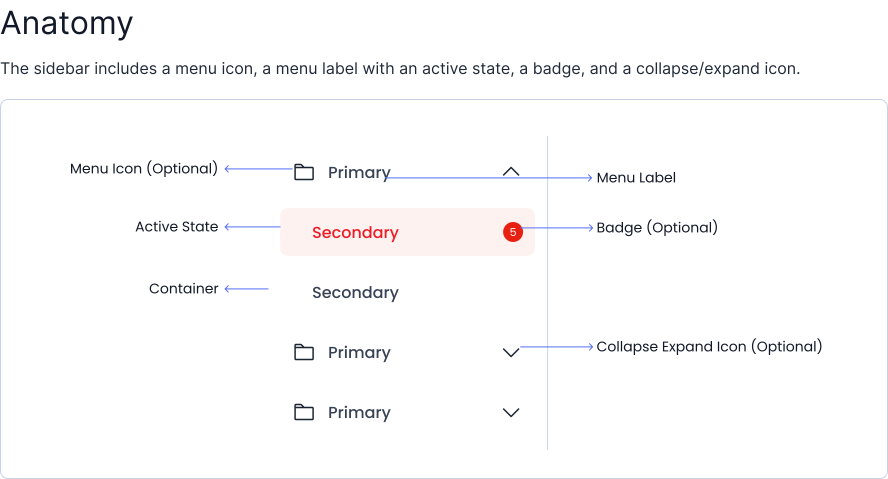
Sidebar Anatomy

Variant

Sidebar variants include with collasible and without collasible

Without Collasible Sidebar

Home
Dashboard
Settings
AccountBillingNotifications

With Collasible Sidebar

HDFC Life
HomeFor DesignerFor Developer
Home
Profile
BillingAccount
Settings
Notifications
SaveLogout

Options

Sidebar is available in different options like with nested and without nested.

With Nested Sidebar

Home
Dashboard
Settings
AccountBillingNotifications

Without Nested Sidebar

HomeDashboardSettingsAccountBillingNotifications

Specifications

Structure and spacing measurements for sidebar.
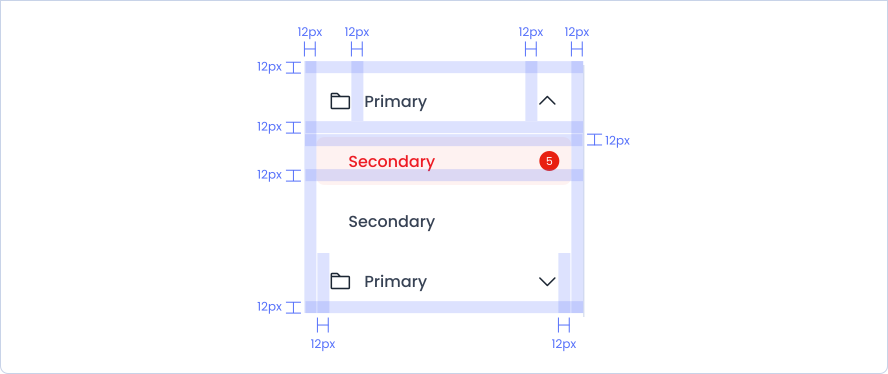
Sidebar Specifications

Live Demo

The sidebar is demonstrated in a live environment in this demo.

Storybook

Gain access to the component library by clicking here. (For developers)

Search
Slider

Helix - HDFC Life 2025