Statistic
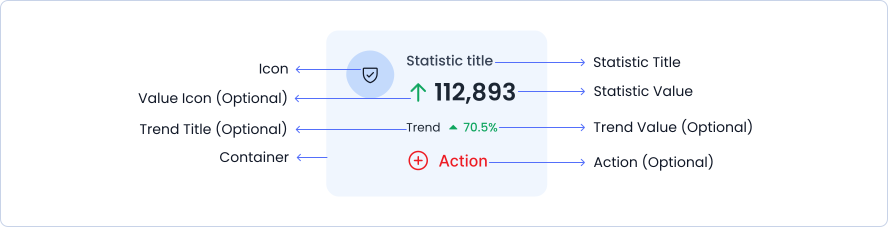
The Statistic component is designed to display key metrics or data points with a variety of customizable options. It can present values with associated icons, trend information, and action buttons, making it ideal for showcasing statistics in dashboards, reports, and data analysis tools.
Usage
- Dashboard Metrics: Use this component to display important metrics or data points in dashboards, such as sales figures, user statistics, or performance indicators.
- Data Reporting: Suitable for reports where key statistics need to be highlighted with accompanying trend information and actionable insights.
- Performance Tracking: Ideal for tracking and visualizing performance metrics with options to show trends and offer actionable options.
Anatomy
A stepper consists of multiple steps that display completed, in-progress, and pending stages, with connecting lines between steps, along with step descriptions and titles.
Options
Left Side Icon
Statistic title1
23,456
Trend
5%
Right Side Icon
Statistic title1
23,456
Trend
5%
Statistic / Yellow
Statistic title1
23,456
Trend
5%
Statistic / Gray
Statistic title1
23,456
Trend
5%
Statistic / Purple
Statistic title1
23,456
Trend
5%
Statistic / Red
Statistic title1
23,456
Trend
5%
Statistic / Indigo
Statistic title1
23,456
Trend
5%
Statistic / Lightblue
Statistic title1
23,456
Trend
5%
Statistic / Blue
Statistic title1
23,456
Trend
5%
With Selected
Statistic title1
23,456
Trend
5%
Specifications
Structure and spacing measurements for statistic.

Live Demo
The Statistic is demonstrated in a live environment in this demo.