Stepper
A stepper component guides users through a series of sequential steps or stages, typically in a multi-step process such as form submissions, checkout processes, or onboarding workflows. Each step in the process is clearly indicated, and users can see their progress and the steps remaining.
Usage
- A stepper can be used in multi-step form filling processes to display progress.
- Stepper can break complex task into multiple steps to simplify the process.
- It can be used in the onboarding process to break tasks into manageable steps, making it easier for new users to get started.
Anatomy
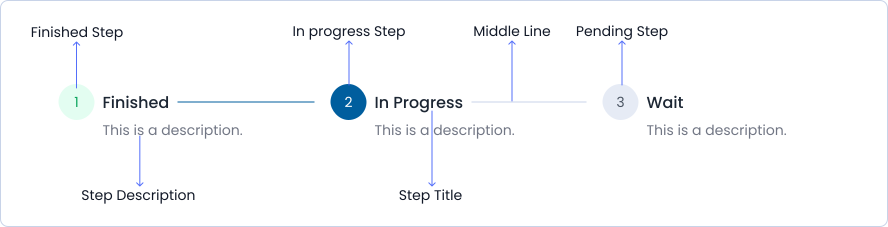
A stepper consists of multiple steps that display completed, in-progress, and pending stages, with connecting lines between steps, along with step descriptions and titles.
Variant
Stepper variants include Filled and Outlined
Filled
Step 1 content
Step 2 content
Step 3 content
Completed content
outlined
Step 1 content
Step 2 content
Step 3 content
Completed content
Options
Stepper options include horizontal and vertical
Horizontal
Step 1 content
Step 2 content
Step 3 content
Completed content
Vertical
Step 1 content
Step 2 content
Step 3 content
Completed content
Specifications
Structure and spacing measurements for Stepper.

Live Demo
The Stepper is demonstrated in a live environment in this demo.