Table
The Table component is designed to display data in a tabular format, allowing for clear organization and presentation of information. It is highly customizable and supports various features such as pagination, checkboxes, and integration with other components like Avatars.
Usage
- Data Presentation: Use this component to present structured data, such as lists of users, products, or other items, in an organised and readable format.
- Interactive Tables: Suitable for tables that require user interaction, such as selecting items with checkboxes or viewing detailed information.
- Dynamic Data: Ideal for displaying dynamic data with features like pagination to handle large datasets.
Anatomy
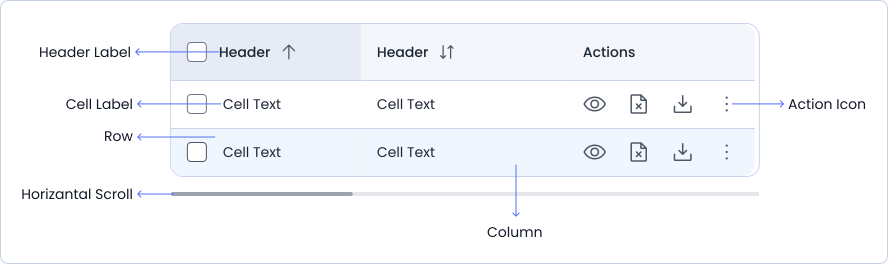
The table includes a header with labeled columns, data cells under each label, multiple rows of information, and action icons for user interaction. It also features a horizontal scroll for navigating through additional columns when needed.
Variant
Table have 3 different style variants.
With Striped
| Name | Age | Gender |
|---|---|---|
| John | 25 | Male |
| Jane | 30 | Female |
With Hightlight On Hover
| Name | Age | Gender |
|---|---|---|
| John | 25 | Male |
| Jane | 30 | Female |
With Bordered
| Name | Age | Gender |
|---|---|---|
| John | 25 | Male |
| Jane | 30 | Female |
Options
Table different Options like with fixed layout and without fixed layout
With Fixed Layout
| Name | Age | Gender |
|---|---|---|
| John | 25 | Male |
| Jane | 30 | Female |
Without Fixed Layout
| Name | Age | Gender |
|---|---|---|
| John | 25 | Male |
| Jane | 30 | Female |
Specifications
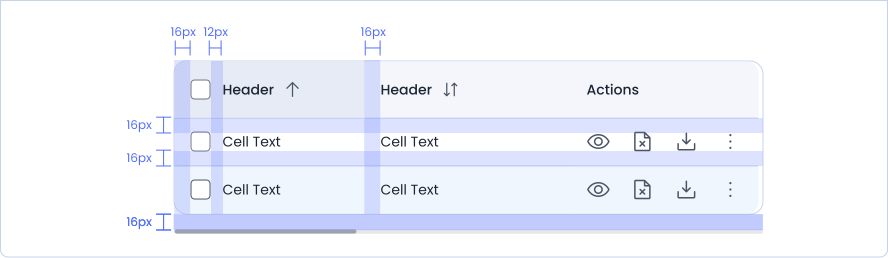
Structure and spacing measurements for table.
Live Demo
The Table is demonstrated in a live environment in this demo.