Tabs
Tabs allow for the organization of content across screens, data sets, and other interactions.
Usage
- Tabs are always used for global navigation at the top of the page or inside an offscreen menu on small screens.
- Tabs are used for chunking content, allowing movement between content within a single page.
- To facilitate easy navigation of information within the same level of information.
Anatomy
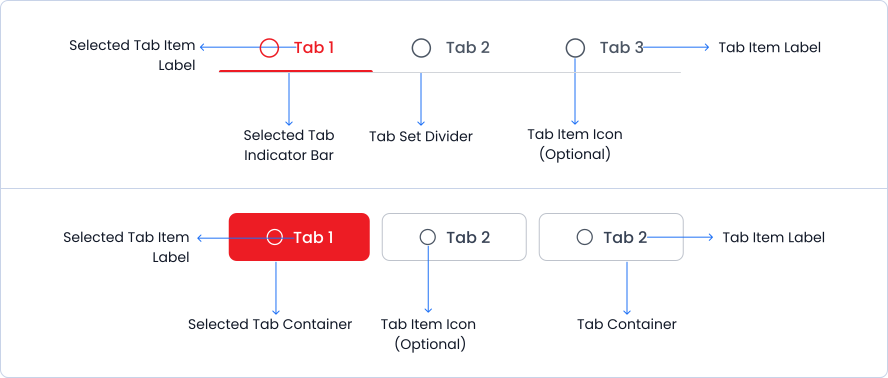
Tabs are designed with multiple labeled tab items, and a divider or container to organise tab sets efficiently, ensuring a clear and intuitive user experience.
Variant
The tab component comes in four variants rounded, filled, underline and outline.
Rounded
Tab 1 content
Tab 2 content
Filled
Tab 1 content
Tab 2 content
Outline
Tab 1 content
Tab 2 content
Underline
Tab 1 content
Tab 2 content
States
Tabs have default & active states.
Rounded
Default
Active
Outline
Default
Active
Filled
Default
Active
Underline
Default
Active
Sizes
Tabs are available in small, medium and large sizes.
Small
Medium
Large
Specifications
Structure and spacing measurements for tabs.

Live Demo
The Tabs is demonstrated in a live environment in this demo.