Timeline
The Timeline component provides a structured way to display a sequence of events or steps, often used to illustrate processes, project milestones, or timelines in applications. It supports a variety of customization options, including step indicators, decorators, and border styles.
Usage
- Project Management: Ideal for visualizing project milestones and progress, showing each phase or significant event in a chronological order.
- Event Tracking: Useful for depicting the sequence of events, such as application processes, historical timelines, or workflows.
- Interactive Processes: Great for applications requiring a step-by-step guide or process, such as onboarding flows or user journeys.
Anatomy
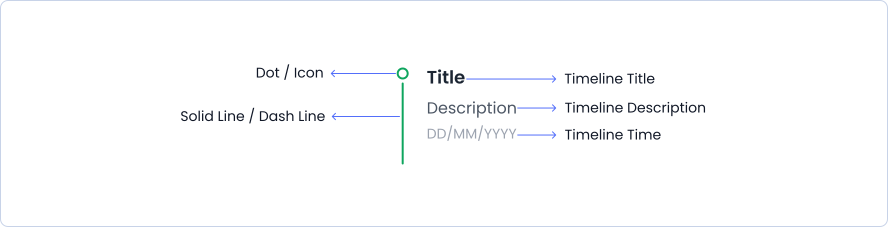
A stepper consists of multiple steps that display completed, in-progress, and pending stages, with connecting lines between steps, along with step descriptions and titles.
Variant
Timeline have 2 different style variants.
With Icon
Application Submission
Sample description
Documentation Upload
Sample description
Preliminary Assessment
Sample description
Underwriting Process
Sample description
Approval Decision
Sample description
Policy Issuance
Sample description
Policy Delivery and Activation
Sample description
With Dot
Project Kickoff
Initial meeting with all stakeholders to outline the project scope and objectives.
January 1, 2024
Requirement Gathering
Collecting detailed requirements from the client to ensure all needs are documented.
January 5, 2024
Design Phase
Creating wireframes and design prototypes for the project's user interface.
January 10, 2024
Update Meeting
Weekly status update meeting to discuss project progress and any blockers.
January 12, 2024
Budget Overrun Risk
Noticed that the project is trending towards exceeding the budget.
January 28, 2024
Project Completion
The project has been completed successfully and delivered to the client.
March 1, 2024
Options
Timeline have different Option like dashed border, solid border, dot decorator and icon decorator.
Solid Border - Icon Decorator
Application Submission
Sample description
Documentation Upload
Sample description
Preliminary Assessment
Sample description
Underwriting Process
Sample description
Approval Decision
Sample description
Policy Issuance
Sample description
Policy Delivery and Activation
Sample description
Dashed Border - Dot Decorator
Project Kickoff
Initial meeting with all stakeholders to outline the project scope and objectives.
January 1, 2024
Requirement Gathering
Collecting detailed requirements from the client to ensure all needs are documented.
January 5, 2024
Design Phase
Creating wireframes and design prototypes for the project's user interface.
January 10, 2024
Update Meeting
Weekly status update meeting to discuss project progress and any blockers.
January 12, 2024
Budget Overrun Risk
Noticed that the project is trending towards exceeding the budget.
January 28, 2024
Project Completion
The project has been completed successfully and delivered to the client.
March 1, 2024
Specifications
Structure and spacing measurements for timeline.

Live Demo
The Timeline is demonstrated in a live environment in this demo.