
Upload
The Upload component is designed for file uploads and offers multiple modes and configurations to suit various use cases. It comes in three variants: button, drag and drop, and thumbnail view.
Usage
- The button triggers a file explorer dialog for users to choose files for upload.
- One or more files can be uploaded via drag and drop.
- Profile photo or avatar can be updated through upload component.
Anatomy
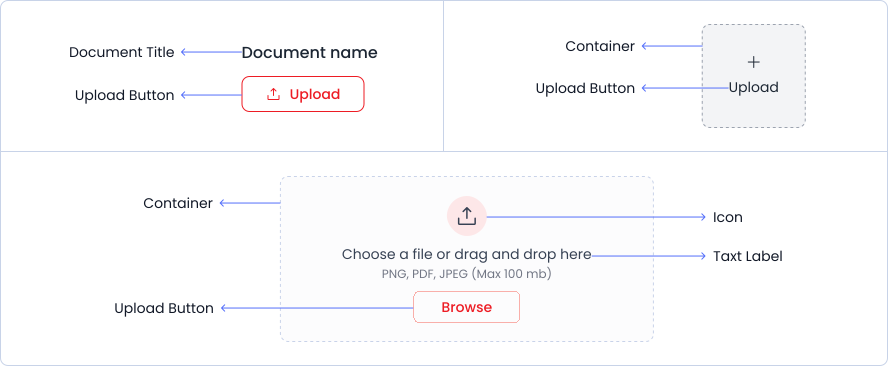
An upload component consists of an upload button, an optional container, a text label, and an optional document name display.
Variant
Upload variants include Default, Extended, Square and Circle options.
Default
Extended
Drag and drop to upload file(s)
or
Square
Circle
Options
Upload options include Default, Extended, Square and Circle
Default
Extended
Drag and drop to upload file(s)
or
Square
Circle
Specifications
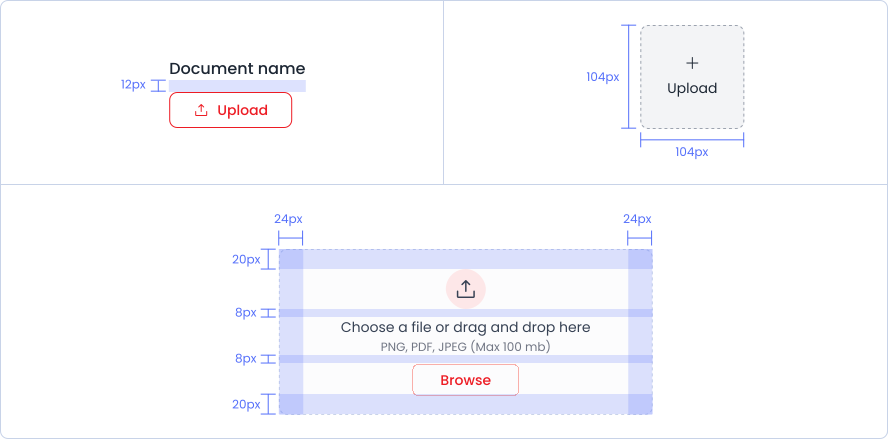
Structure and spacing measurements for Upload.
Live Demo
The Upload is demonstrated in a live environment in this demo.